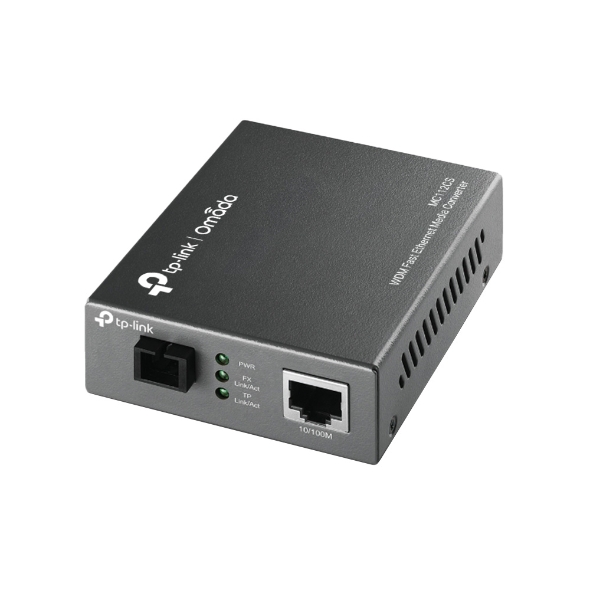
SKU: MC112CS
Availability: In Stock
Brand: TP-Link
Category: Cables & Adapters
100% Guarantee Safe Checkout
The TP-Link MC112CS is a high-performance standalone WDM media converter designed to seamlessly convert between 100BASE-FX single-mode fiber and 10/100Base-TX copper Ethernet connections. Utilizing advanced Wavelength Division Multiplexing (WDM) technology, it efficiently transmits and receives data over a single strand of fiber (simplex), effectively halving cabling costs without compromising performance.
Key features include compliance with IEEE 802.3 and 802.3u standards, an SC/UPC fiber interface paired with a 10/100M RJ45 copper port featuring Auto MDI/MDIX, and support for longwave (LX) lasers enabling fiber distances up to 20 km. The MC112CS operates at a transmit wavelength of 1310nm and a receive wavelength of 1550nm, requiring a complementary device configured inversely.
Designed with reliable network management in mind, this converter supports Link Fault Pass Through (LFPT), Far End Fault (FEF) detection, full duplex IEEE 802.3x flow control, and half-duplex backpressure to minimize packet loss on failures. Front-panel LEDs provide clear status indicators for power, link/activity, full duplex, and speed.
The compact form factor measuring approximately 94.5 × 73.0 × 27.0 mm and an external power adapter offer flexible standalone deployment. Built for industrial operational conditions with an ambient temperature range of 0°C to 40°C, it’s ideal for extending fiber networks over long distances in commercial, data center, or ISP environments.
Included in the package is the MC112CS media converter unit, an external power adapter, and an installation guide for easy set-up.
For detailed product specs and support visit the official TP-Link site: [TP-Link MC112CS](https://www.tp-link.com/au/business-networking/omada-accessory-media-converter/mc112cs/).
| Category | Media Converter |
| Part Number | MC112CS |
| Model | MC112CS |
| length_meters | 20000 |
| Pin Configuration | 8P8C |
| Cable Type | SC\/UPC fiber |
| Conductor Material | Copper |
| Connector Type | RJ45 8P8C; SC\/UPC |
| Cable Length (Display) | 20 km |
| Length Unit | meters |
| operating_temperature_c_min | 0 |
| operating_temperature_c_max | 40 |
| Power over Ethernet | |
| maximum_speed_gbps | 0.1 |
| Supported Data Rate | 10\/100 Mbps |
| standard_compliance | IEEE 802.3,IEEE 802.3u,IEEE 802.3x |
| standard_compliance | IEEE 802.3,IEEE 802.3u,IEEE 802.3x |
| Data Transfer Rate | 10\/100Mbps |
| Fiber Type | Single-mode |
| Fiber Connector | SC\/UPC |
| Wavelength TX | 1310 nm |
| Wavelength RX | 1550 nm |
| Transmission Distance | Up to 20 km |
| Copper Port | 1 x 10\/100M RJ45 (Auto MDI\/MDIX) |
| media_conversion | 100BASE-FX to 10\/100Base-TX |
| Flow Control | Full Duplex IEEE 802.3x,Half Duplex Backpressure |
| link_fault_pass_through | Supported |
| Power Supply | External power adapter included |
| LED Indicators | PWR,Link/Act,FDX/Col,SPD |
| Operating Temperature | 0\u00b0C to 40\u00b0C |
| Dimensions | 94.5 \u00d7 73.0 \u00d7 27.0 mm |
| Weight | Not specified |
 Added to cart


Product successfully added to cart
Price: $0.00
Inclusive of all Taxes
(Also includes all applicable duties)